API Capabilities
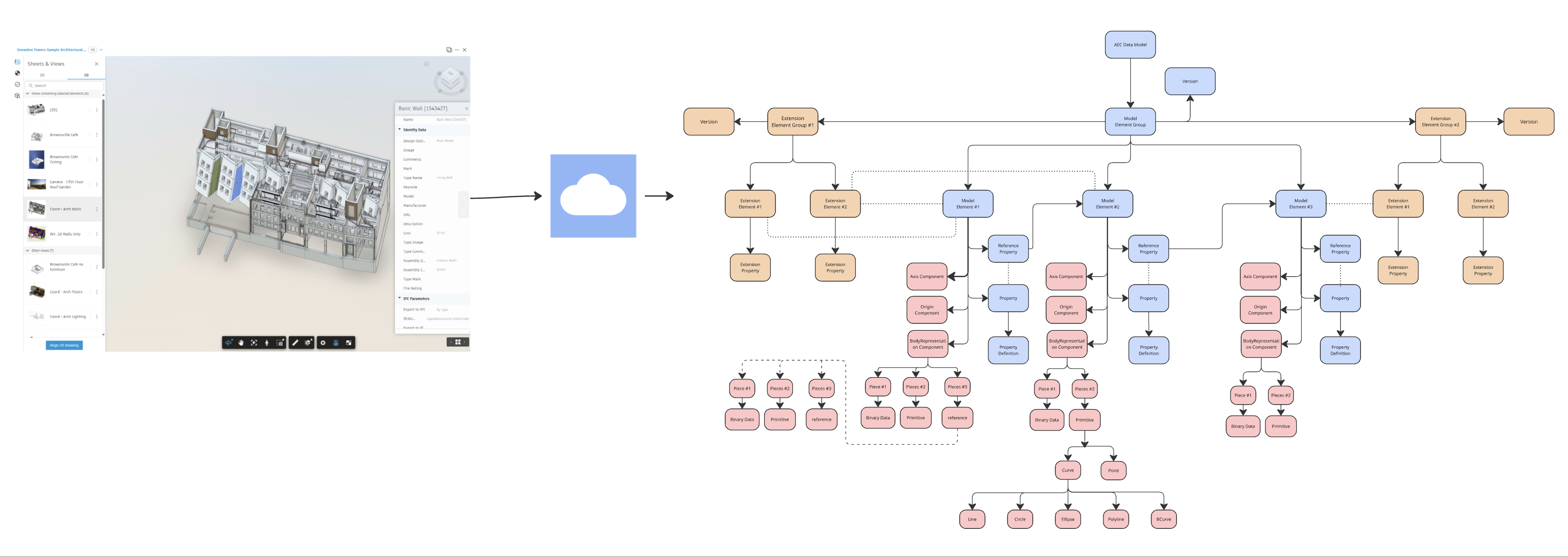
Using the AEC Data Model API, you can perform the following actions:
- Create new property definition collection.
- Create custom properties that are not present in the model elementGroup.
- Add extension elementGroup to store additional properties.
- Add extension elements/properties to the extension elementGroup.
- Associate elements in the model elementGroup with extension properties.
- Add extension properties to existing model elementGroup.
- Update extension properties.
- Filter model elements by extension properties.
- Retrieve all hubs that match a specific criterion, such as the name of the hub that you want. Only exact matches are currently supported.
- Retrieve a hub using a hub ID.
- Retrieve all projects that match the filter criteria from a specified hub.
- Retrieve a project using a project ID from a specified hub.
- Retrieve all top-level folders within a specified project.
- Retrieve all subfolders within a specified folder that meet the filter criteria.
- Retrieve a folder using the folder ID.
- Retrieve the latest elementGroup data based on elementGroup ID.
- Retrieve elementGroup by version number and elementGroup ID.
- Retrieve elementGroups in the given hub using additional RSQL filters, if provided.
- Retrieve elementGroups in the given project using additional RSQL filters, if provided.
- Retrieve elementGroups in the given folder using additional RSQL filters, if provided.
- Retrieve element using element ID.
- Retrieve elements from given hub using additional RSQL filters, if provided.
- Retrieve elements from given project using additional RSQL filters, if provided.
- Retrieve elements from given folder using additional RSQL filters, if provided.
- Retrieve elements from given elementGroup using additional RSQL filters, if provided.
- Retrieve elements from given elementGroup and version by using additional RSQL filters, if provided.
- Retrieve distinct property values for ElementGroups by ID and name. For more information, refer Get Distinct Values of Properties.
- Retrieve geometry pieces including primitives, geometry instance references, and binary geometry data.
- Access origin components containing x, y, z coordinates defining element locations.
- Access axis components containing curves defining element axes.
- Query geometry binary data with byte range references to actual binary files.
- Retrieve serialized geometry data including curves (lines, circles, bcurves) and points.
- Export geometry data to industry-standard formats such as IFC for interoperability across tools and platforms.
For detailed information on the supported queries, objects, and inputs, refer to the Reference Guide section.